
Reverse Delay Audio Tool for iPhone
Overview
YaleD - Reverse Delay is a specialized audio tool designed for iPhone users interested in creative sound manipulation. Developed by Sonosaurus LLC, the application falls within the Music & Radio category and offers a unique functionality: reversing audio delays. This tool enables users to experiment with time-based audio effects, making it particularly useful for musicians, podcasters, and audio enthusiasts who seek innovative ways to enhance their recordings. The app supports iOS 16.4 or later, ensuring compatibility with modern iPhone devices. It is available in English only, which may limit accessibility for non-English speakers.
While the developer has not provided detailed information about real-world usage scenarios, the core purpose of YaleD appears to be creative audio editing. It allows users to reverse the delay of audio signals, which can produce surreal, ambient, or rhythmic effects. This capability could be used in music composition, sound design for videos, or live audio experimentation. The software was released on December 12, 2023, and is currently in version 1.2. As a free application, it offers accessible entry into advanced audio manipulation without cost.
Key Features & Capabilities
- Reverse Delay Functionality – Allows users to reverse the delay effect on audio signals, creating unique time-altered sounds.
- iPhone-Optimized Interface – Designed specifically for the iPhone platform, ensuring smooth interaction with touch controls.
- Audio Signal Manipulation – Enables real-time or post-recording adjustment of audio delay parameters.
- English Language Support – The app is fully functional in English, providing consistent user experience for English-speaking users.
- Lightweight Design – With a file size of 14.8 MB, the app is compact and efficient, suitable for devices with limited storage.
Users can apply reverse delay to recorded tracks or live audio input, making it useful for creating layered soundscapes. For example, a musician might use the tool to generate ambient textures by reversing a delayed guitar riff. A podcaster could experiment with voice echoes to add dramatic effect. The app’s focus on a single, precise function suggests it is tailored for users who value targeted audio tools over all-in-one solutions. Its lightweight nature also makes it ideal for quick, on-the-go audio experiments.
User Interface, Workflow & Performance
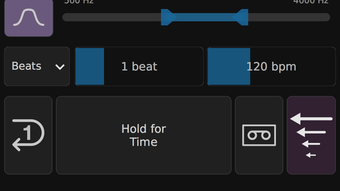
The user interface of YaleD - Reverse Delay is designed for the iPhone platform, leveraging touch-based navigation and responsive controls. While specific UI details are not provided, the app’s categorization as a music and audio tool suggests a layout focused on audio parameters, such as delay time, feedback, and reversal settings. The workflow appears streamlined, allowing users to adjust settings and apply effects with minimal steps.
Performance details were not specified by the developer. However, given its compact size of 14.8 MB and targeted release for iOS 16.4 or higher, the app is expected to run efficiently on supported devices. The developer did not provide information on CPU or RAM usage, so actual resource behavior remains unknown. Stability is assumed to be consistent with standard iOS app standards, though no testing data was available. The app’s single-function design may contribute to predictable performance, minimizing crashes or lag during use.
Compatibility & System Requirements
YaleD - Reverse Delay is compatible with iPhone devices running iOS 16.4 or later. This ensures the app leverages modern iOS features while maintaining broad accessibility across recent iPhone models. The application is available exclusively for the iPhone platform and does not support iPad or Mac devices. It is not available on other operating systems.
The installation size is 14.8 MB, which is relatively small and suitable for devices with limited storage. The developer did not specify exact hardware requirements beyond the OS version. No additional system resources or peripheral dependencies were mentioned. Compatibility information was partially provided, with no details on supported iPhone models or processor requirements. Users should ensure their device meets the minimum iOS version to install and run the software.
Pros and Cons
Pros
- Free to download and use, with no hidden costs
- Compact size of 14.8 MB, ideal for storage-constrained devices
- Specialized functionality for creative audio manipulation
- Optimized for iPhone with touch-friendly interface
- Released on a recent date, indicating active development
Cons
- Only available in English, limiting non-English users
- No information on hardware or performance specifications
- Exclusive to iPhone, no iPad or Mac support
- Limited to iOS 16.4 or higher, may not work on older devices
- Developer did not provide detailed system requirements
FAQ Section
Is YaleD - Reverse Delay compatible with my iPhone?
The app requires iOS 16.4 or later. Check your iPhone’s operating system version in Settings > General > About > Software Version to confirm compatibility.
Is the app safe to download and use?
YaleD - Reverse Delay was published on Softonic, a reputable software platform. The app is free and does not require additional permissions beyond standard audio access.
How often are updates released?
Version 1.2 was released on December 12, 2023. The frequency of future updates is not specified by the developer.
Can I use YaleD offline?
Yes, the app does not require an internet connection once installed. All features are available offline.
What type of license does YaleD have?
YaleD is a free software tool. No license key or subscription is required for use.
Final Thoughts
YaleD - Reverse Delay stands out as a focused, lightweight audio tool tailored for iPhone users seeking creative sound design options. Its ability to reverse audio delays offers a unique feature set within the Music & Radio category. While the app lacks detailed technical documentation and supports only English, its free availability and small footprint make it accessible for casual and professional users alike.
The single-purpose design enhances usability and reduces complexity, ideal for quick audio experiments. For those interested in exploring time-based audio effects without cost, YaleD provides a promising entry point. The app’s recent release date suggests ongoing relevance and potential for future enhancements.
Download yaleD now







